
Ever notice a small “preferred” label showing up next to certain publications in your Google Search results? That’s not random. It’s Google’s Preferred Sources feature, and it’s changing how people discover content.
Search is becoming more personalized every year. AI Overviews and AI Mode have turned results into a curated feed rather than a static list of links. Preferred Sources is part of that shift — and it matters for publishers and brands.
| Quick AnswerPreferred Sources lets users pick websites they trust and want to see more of in Google Search.Selected sites can get a “preferred” badge in Top Stories, AI Overviews, and AI Mode.It is a personalization and visibility feature — Google has not said it directly improves organic rankings.Strong SEO, technical health, and audience trust still decide long-term visibility. |
What Is Google Preferred Sources?
In simple terms, it’s a personalization tool built into Search. Readers choose the sites they want to see more from.
- Users select a website as a preferred source through Google’s source preferences settings, or a button embedded on the publisher’s own site.
- Selected sites are more likely to appear in Top Stories, marked with a preferred badge.
- The same badge can appear in AI Mode and AI Overviews for users who made that selection.
- This is reader-driven, not Google editorially ranking one site above another.
Why Does the Source Preference Tool Matter?

For years, SEO has been mostly about ranking for keywords. This tool adds a second, parallel goal: being recognized.
- It shifts part of the conversation from “can we rank for this query” to “would someone choose us on purpose.”
- A site can rank well and still be forgettable — Preferred Sources rewards the opposite.
- It doesn’t replace ranking signals. It adds a visible layer of audience loyalty on top of them.
For the full rollout timeline, see our earlier piece on the Google Preferred Sources update.
What This Means for SEO (and What It Doesn’t)
This is the part worth getting right: Preferred Sources is not a confirmed ranking factor. Google has not said selection improves organic rankings.
| What Preferred Sources Does | What It Does Not Do |
|---|---|
| Boosts visibility in Top Stories for users who selected you | Guarantee higher organic rankings |
| Can show a preferred badge in AI Overviews and AI Mode | Replace core ranking signals like relevance and authority |
| Reflects direct reader trust and loyalty | Work as a substitute for technical SEO or quality content |
| Adds a personalization layer on top of Search | Apply automatically — users must opt in |
The fundamentals still decide long-term visibility:
- Useful content that matches real search intent
- Clear site structure and easy navigation
- Strong crawlability and indexability
- Sensible internal linking
- Topical relevance built consistently over time
Solid SEO Services today combine these fundamentals with genuine topical authority — the kind that earns a reader’s trust, not just a search engine’s approval.
Why Technical SEO Still Matters
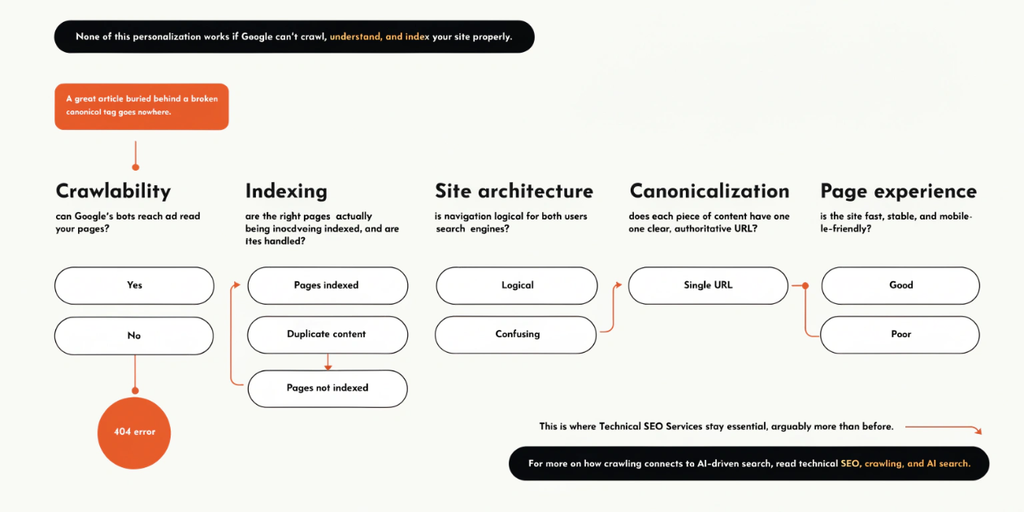
None of this personalization works if Google can’t crawl, understand, and index your site properly. A great article buried behind a broken canonical tag goes nowhere.
- Crawlability: can Google’s bots reach and read your pages?
- Indexing: are the right pages actually being indexed, and are duplicates handled?
- Site architecture: is navigation logical for both users and search engines?
- Canonicalization: does each piece of content have one clear, authoritative URL?
- Page experience: is the site fast, stable, and mobile-friendly?
This is where Technical SEO Services stay essential, arguably more than before. For more on how crawling connects to AI-driven search, read technical SEO, crawling, and AI search.
Where Digital Marketing Fits In
This isn’t just an SEO story. Becoming a source people recognize touches several channels at once:
- Content marketing that consistently delivers value
- Brand awareness built across search and social
- Audience engagement that turns visitors into repeat readers
- Paid campaigns that introduce new readers to strong content
A modern digital marketing agency needs to think beyond rankings alone, and coordinate all of this together. If you’re choosing a partner, see our guide on choosing the right digital marketing agency.
What About Google Ads?
Worth clarifying: Preferred Sources is an organic, opt-in personalization feature. It has nothing to do with paid placements.
- Ad spend does not influence whether a site can be selected as a preferred source.
- Google Ads services deliver immediate, paid visibility.
- SEO and content build organic authority and trust over the longer term.
- Using ads to introduce readers to strong content is smart. Expecting ads to buy preferred-source status is not.
How to Add the Preferred Source Button to Your Website
Google offers three ways to let readers add your site as a preferred source directly from your own pages.
| Method | Best For | Effort | Returns Reader to Page? |
|---|---|---|---|
| Standard JavaScript (recommended) | Most websites | Very low — 2 lines of HTML | Yes |
| Advanced JavaScript | Sites needing custom button design | Moderate — custom styling required | Yes |
| Deeplink | CMS platforms that can’t embed scripts | Very low — one link | No |
1. Standard JavaScript implementation
Add this to your page, preferably inside the <head> element:
| <script async src=”https://news.google.com/swg/js/v1/publisher.js”></script> |
Then place this wherever you want the button to appear:
| <div google-add-preferred-source-btn></div> |
Optional dark theme:
| <div google-add-preferred-source-btn data-theme=”dark”></div> |
2. Advanced implementation (custom design)
Load the script in manual mode and bind it to your own button:
| <script async src=”https://news.google.com/swg/js/v1/publisher.js” data-preferred-sources-control=”manual”></script> <button id=”my-custom-button”>Follow us on Google</button> <script> (window.PREFERRED_SOURCE = window.PREFERRED_SOURCE || []).push(() => { document.getElementById(‘my-custom-button’).addEventListener(‘click’, () => { PREFERRED_SOURCE.addPreferredSource(); }); });</script> |
For module-based build systems:
| import { preferredSource } from “https://news.google.com/swg/js/v1/publisher.mjs”; |
3. Deeplink implementation (no JavaScript)
A plain link works if your CMS can’t support embedded scripts:
| <a href=”https://google.com/preferences/source?q=yourdomain.com” target=”_blank” rel=”noopener”> Add us as a Preferred Source</a> |
Before you paste anything, check:
- Domain, not subdirectory: works at the root domain or subdomain level (example.com or news.example.com), not on single URLs.
- Eligibility: search your own domain in the source preferences tool to confirm it’s recognized.
- Consent management: the standard button loads an iframe from news.google.com — include it in your cookie consent flow.
- Placement: header, end of articles, and navigation tend to work best.
If editing your CMS’s head section feels risky, hand this off to your Technical SEO Services provider rather than testing it live on production.
How Businesses Should Respond
- Publish genuinely useful content, consistently.
- Build topical authority instead of chasing isolated keywords.
- Strengthen technical SEO foundations — crawlability and indexing come first.
- Make your brand recognizable through consistent voice and design.
- Add the preferred source button using whichever method fits your site, and place it where readers will see it.
For sites still working through the basics of AI-driven search visibility, our guide on optimizing your website for generative AI is a practical next read.
Conclusion
Preferred Sources isn’t a shortcut to better rankings. It’s a shift in emphasis.
The future of search isn’t only about being the site that ranks for a query. It’s increasingly about being the site people already know, trust, and choose to see more of. That’s harder to build than a keyword-optimized page — but it’s more durable.