

Key Takeaways
Leverage Real User Data: Google Search Console provides authentic insights into what users are actually searching for. This data is more reliable than guessing trends or relying solely on third-party keyword tools. You can use Regex in GSC.
Use Regex to Unlock Patterns: Regex in Google Search Console allows you to filter queries by patterns, not just exact words. This enables you to discover AI content ideas hidden in long-tail, question-based, or complex queries.
Identify High-Value AI Content Opportunities: With regex, you can uncover topics with high search intent, beginner-friendly queries, tool comparisons, and tutorial ideas — all ideal for an AI-focused content strategy.
Build a Data-Driven AI Content Strategy: By systematically analyzing regex-filtered queries, you can cluster related topics, identify content gaps, and plan a comprehensive content calendar that aligns with real user intent.
Optimize Existing Content for Maximum Impact: Regex insights not only help you create new content but also identify existing pages that can be updated, expanded, or optimized to capture more traffic.
Integrate With Other Marketing Channels: Combine your insights from Google Search Console with Social Media Services, Google Ads Services, and SEO campaigns managed by a Digital Marketing Agency to maximize reach and conversions.
Monitor Trends Over Time: Regularly applying regex to your GSC data allows you to detect emerging AI trends, seasonal spikes, and shifts in user behavior, keeping your content strategy fresh and relevant.
Save Time and Increase Precision: Using regex filters automates the process of discovering relevant queries, reducing guesswork and allowing you to focus on content creation rather than manual keyword research.
Enhance Content for Multiple Intent Types: Regex lets you capture a wide range of query types — how-to guides, beginner searches, tool/software comparisons, and FAQs — helping you create comprehensive content that serves diverse user needs.
Data-Driven Decisions Lead to Better ROI: By combining regex insights with analytics and paid campaigns, every content decision becomes backed by real data, improving engagement, traffic, and overall ROI.
Introduction
In the age of rapid digital innovation, AI technologies are influencing nearly every industry. From automated writing assistants to AI‑powered analytics platforms, interest in artificial intelligence has exploded — and so has the volume of search queries around it.
For content creators, marketers, and businesses aiming to capture organic traffic, the goal should no longer be simply “writing about AI.” Instead, the focus must be on identifying real AI content ideas that users are actively searching for, and then producing content that meets their needs.
This is where Google Search Console becomes a powerful, yet underutilized, asset. By combining it with regex (regular expressions) — a flexible query filtering syntax — you can extract insights such as:
- Queries that reveal topics your audience truly cares about
- High‑intent search terms hungry for content
- Long‑tail and question‑based terms ideal for blogs and tutorials
- Untapped or low‑competition keyword patterns
In this comprehensive guide, you’ll learn how to use regex in Google Search Console to uncover high‑value AI content opportunities, transform raw data into a strategic content roadmap, and seamlessly align your content marketing efforts with user intent. By the end, you’ll have a full AI content strategy built on data rather than guesswork.
What Is Google Search Console and Why It Matters for AI Content Strategy
Before we dive into regex, it’s essential to fully understand the role of Google Search Console in your AI content workflow.
What Google Search Console Does
Google Search Console is a free tool provided by Google that allows website owners and marketers to:
- Monitor how their site appears in search results
- See which queries bring users to their site
- Evaluate impressions, clicks, impressions share, and click‑through rate (CTR)
- Identify pages that need SEO improvement
- Detect issues like crawl errors or mobile usability problems
From a macro perspective, it shows what users actually searched for before landing on your site — which makes it extremely valuable for content ideation.
Why It’s Vital for AI Content Strategy
AI is a broad topic. People searching for “AI” may mean anything from machine learning tutorials to AI tools for content creation. If you produce content based on intuition alone, you risk:
- Creating content nobody searches for
- Missing high‑intent, highly actionable query topics
- Losing traffic to competitors who target specific queries directly
This is where Google Search Console shines. It shows the real language people used to search — the exact terms, phrases, and questions your content must address.
And when paired with AI content research tools, you can scale this insight to build a complete, data‑driven AI content strategy that targets real user demand.
Understanding Regex: The Key to Unlocking High‑Volume AI Content Ideas
What Is Regex?
Regex stands for regular expressions, which are special text patterns used to find specific kinds of strings within a dataset. In the context of Google Search Console, regex allows you to filter your search query data beyond simple keyword matches.
Without regex, you might only discover queries that match exactly what you typed. With regex, you can extract patterns like:
- Anything that contains AI
- Queries that start with certain words
- Queries that are structured like questions
- Queries that include variations of a term (e.g., AI, ai, Ai)
This level of precision is essential for uncovering diverse AI content ideas that aren’t easily visible through ordinary filters.
Why Use Regex in GSC for AI Content
Using regex in Google Search Console helps you:
- Identify long‑tail keyword patterns
- Extract intent‑rich queries
- Surface topical themes guides and tutorials should cover
- Move beyond generic keyword research tools
- Find queries that match patterns, not just exact words
In short: regex allows you to listen better to what your audience is searching for — and create content that directly answers their questions.
A Quick Overview: Regex Syntax You’ll Use in GSC
Google Search Console uses a flavor of regex called RE2, which is robust but simplified for performance. Here are the most important symbols you should know:
| Symbol | Meaning |
| . | Matches any single character |
| * | Matches 0 or more of the previous character |
| + | Matches 1 or more of the previous character |
| ` | ` |
| () | Groups multiple elements together |
| [] | Character set — matches any one character inside brackets |
| ^ | Begins with (useful to anchor the start of a query) |
| $ | Ends with (useful to anchor the end of a query) |
Simple Example
how to .* ai
This matches queries that begin with “how to” and contain the word ai somewhere afterward — like:
- how to use ai tools
- how to implement ai in business
- how to train ai models with Python
Once you grasp these basics, you’ll be ready to build patterns that reveal deep insights from your search data.
How to Apply Regex in Google Search Console
Regex is most useful when applied directly to your query data in Google Search Console. Here’s the workflow:
Step‑by‑Step
- Open Google Search Console and click on Performance (Search Results).
- Click “+ New” at the top of the report.
- Choose Query > Custom (Regex).
- Enter your regex pattern.
- View the list of queries that match your expression.
This instantly filters your search query list to show only relevant patterns. Instead of digging manually, regex gives you precise results related to AI content interest — perfect for identifying both broad and niche topics.
Steps to Write Regex Patterns for AI Content
Writing effective regex patterns for AI content research involves a few logical steps:
Step 1: Define Your AI Content Goals
Identifying your goal helps shape the regex patterns you’ll need. For example:
| Goal | Sample Regex Use Case |
| Find how‑to articles users want | Queries starting with “how to” + AI |
| Find beginner tutorials | Queries containing “beginner” + AI |
| Find tool comparisons | Queries containing “vs” or “or” |
| Find software searches | Queries containing “best AI tool” |
Your regex should always reflect the content outcome you intend to produce.
Step 2: Identify AI‑Related Terms You Want to Capture
AI language can vary. Some common terms include:
- AI
- ai
- Artificial intelligence
- Machine learning
- ML
- Deep learning
Your regex patterns should include these variations to ensure broad capture of search queries.
Step 3: Learn Basic Regex Syntax (As Covered Earlier)
Knowing the building blocks (*, +, |, (), etc.) allows you to customize your patterns for complex query structures.
Step 4: Start Writing Patterns
Begin with simpler patterns and grow more advanced as needed. You might start with:
(ai|artificial intelligence|machine learning)
…then combine it with qualifiers like “how to” or “best”.
Step 5: Test & Refine
Always apply your regex to the Performance report and verify if the results align with your expectation. Refine as necessary.
Step 6: Apply Patterns Regularly
Make regex filtering a regular part of your reporting cycle — especially if you’re building a long‑term AI content strategy.
Best Regex Patterns for AI Content Research
Here is a detailed chart of regex patterns that are extremely helpful for uncovering AI‑oriented queries:
| Regex Pattern | Purpose | Sample Matched Queries |
| `(ai | artificial intelligence | machine learning)` |
| `how to (use | create | build |
| `(beginner | easy | simple |
| `(best | top | free) .* ai (tool |
| `(what | which | where |
| ^ai .* | Queries that start with “ai” | ai content creation tools |
| .* ai$ | Queries that end with “ai” | tools for content ai |
| [0‑9]+ .* ai | Queries with numbers | 5 ai tools for writers |
| `(ai | ml) (tutorial | course)` |
| `ai .* (vs | or)` | Comparison searches |
These patterns, when applied in regex in Google Search Console, reveal a wide spectrum of query types — from general interest to action‑oriented searches.
Applying Regex Patterns to Extract AI Content Ideas
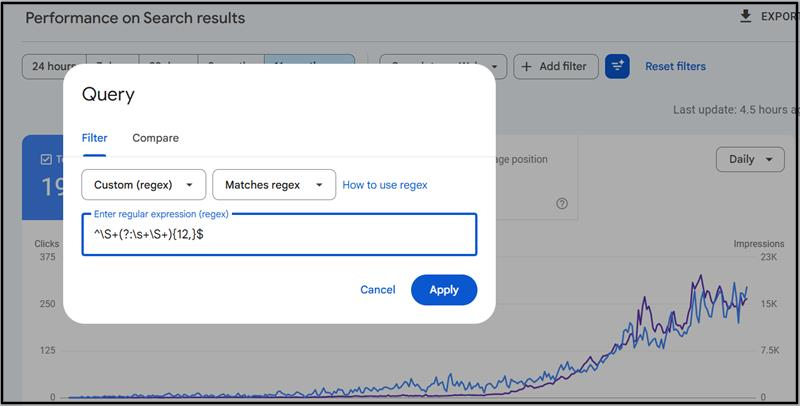
Now that you know how to write regex and what patterns to use, here’s how to turn this into your content strategy:
1. Run Each Regex Pattern in GSC
Apply the patterns one by one:
- Run the “how‑to” pattern
- Run the beginner pattern
- Run the comparison pattern
- Run tool search pattern
This gives you segmented lists of queries based on intent.
2. Sort by Clicks & Impressions
Once filtered, sort the list by Impressions to find what people see most in search results, then by Clicks to see what they engage with.
3. Identify Patterns in User Intent
Look for intent signals:
- Do users want tutorials?
- Are they asking “what is…” questions?
- Are they comparing tools?
These intent signals are gold for content planning.
4. Extract Keyword Themes
Group similar queries together. For example:
| Group | Example Queries |
| AI Tools | best ai tools, top ai software |
| Tutorials | how to use ai tools |
| Beginner Search | ai for beginners |
| Comparisons | ai tool vs ml tool |
These clusters become content pillars, blog topics, FAQs, and long‑form guides.
Analyze & Generate Content Ideas
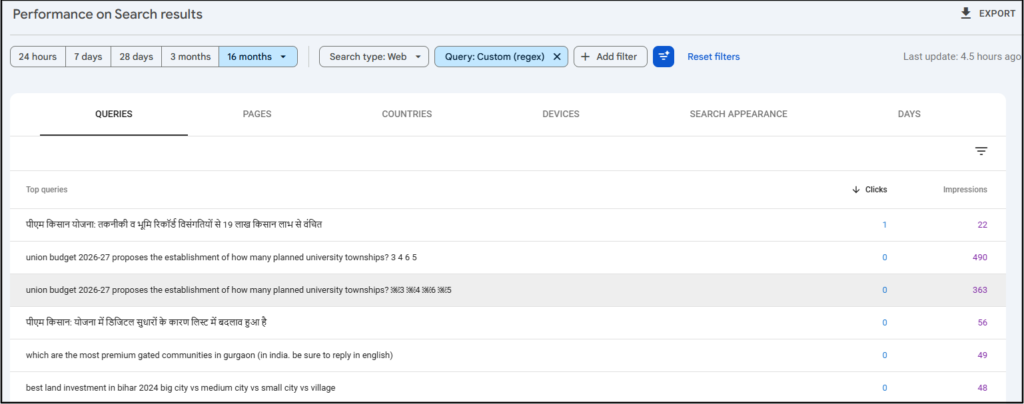
After you’ve gathered segmented query lists:
Sort and Prioritize
- High Impressions + High Clicks — Top priority content
- High Impressions + Low Clicks — Opportunity areas
- Low Impressions + High CTR — Specialized niche content
Identify Content Gaps
If your site isn’t ranking for high‑impression queries, you have content gaps you can fill with new pages or optimized content.
Use AI Tools to Brainstorm Topics
You can feed these queries into AI content research tools (including ChatGPT, Jasper, Frase, Surfer SEO, etc.) to generate:
- Article titles
- Topic outlines
- Meta descriptions
- FAQ sections
- Video scripts
These tools help you move from raw data to fully fleshed content — faster.
Google Search Console Tips for Better Results
Using regex in GSC becomes even more powerful when optimized with smart practices:
1. Combine Regex With Page Filters
This allows you to see which specific pages are associated with certain query patterns.
2. Use Case‑Insensitive Patterns
Include variations like:
AI|ai|Ai
This makes sure you’re capturing all forms of “AI”.
3. Export and Track Over Time
Export regex‑filtered data and track trends month to month. Are certain queries increasing? Decreasing?
4. Monitor Impressions Vs Clicks
A pattern with high impressions but low clicks often means content needs improvement — opportunity!
5. Pair With Analytics Metrics
Cross‑reference with Google Analytics to see engagement metrics like:
- Bounce rate
- Time on page
- Scroll depth
These insights show whether users find your content useful once they click.
Turning Regex Insights Into a Full AI Content Strategy
Once you’ve extracted patterns and identified query clusters, it’s time to turn this into a structured plan.
Build Content Pillars
Based on query groups:
| Pillar | Content Types |
| AI Tutorials | Step‑by‑step guides, how‑tos |
| AI Tools | Listicles, reviews |
| Beginner Guides | “AI for beginners” content |
| Comparisons | “AI vs” and tool comparison pieces |
This becomes the backbone of your content calendar.
Support With Marketing Channels
Once content is published:
- Use Social Media Services to amplify your articles
- Leverage Google Ads Services to promote high‑value content
- Work with a Digital Marketing Agency to integrate SEO and paid strategies
This multi‑channel approach increases reach and drives traffic from both organic and paid search.
Advanced Tips and Tricks for Google Search Console
Here are additional strategies pro marketers use:
Refine Your Regex Over Time
Improve patterns as search behavior evolves.
Example:
Use patterns like:
how to | step by step | example | tutorial
…to extract more sophisticated how‑to variations.
Segment by Landing Page
See which URLs rank for high‑interest queries — helps prioritize content updates.
Monitor Seasonal Trends
Some AI topics spike during certain months (e.g., AI events, new product launches). Regex filters help catch seasonal variations.
Use Regex Outside of Queries
While most people use regex for queries, it can also be used for page filters to:
- Group similar pages
- Track performance for content clusters
Using Google Search Console for AI Content Marketing Success
At this point, you should be able to use regex in Google Search Console not just as a technical feature, but as a core part of your content marketing engine.
With data‑backed query insights and pattern filtering, you can:
- Generate targeted AI content ideas
- Build a scalable AI editorial plan
- Optimize content for real search demand
- Improve rankings and engagement over time
- Support SEO with paid campaigns via Google Ads Services
- Amplify content reach with Social Media Services
- Drive strategy execution through a Digital Marketing Agency
Frequently Ask Questions (FAQs)
What is Google Search Console and why is it important for AI content strategy?
Google Search Console is a free tool by Google that shows how your website performs in search. It helps identify the queries users search for, which pages they click on, and potential content gaps. For an AI content strategy, GSC provides data-driven insights into what AI-related topics users are searching for, enabling you to create content that matches real demand.
What is regex and how does it work in Google Search Console?
Regex, or regular expressions, is a sequence of characters defining a search pattern. In GSC, regex allows you to filter search queries precisely — for example, finding all queries that contain “AI,” start with “how to,” or include variations like “artificial intelligence” or “ML.” It’s a powerful way to uncover AI content ideas that simple keyword filters might miss.
Why should I use regex instead of standard search filters in GSC?
Standard filters only match exact words or phrases. Regex allows for pattern-based filtering, letting you capture long-tail keywords, question-based searches, tool comparisons, and beginner-focused queries. This precision makes your AI content research more efficient and actionable.
Can I use regex to find beginner-focused AI content opportunities?
Yes! For example, using the regex:
(beginner|easy|simple|for dummies) .* ai
will filter queries like “AI for beginners” or “simple AI tools,” which are ideal for tutorials, guides, or introductory content.
What are some common regex patterns for AI content research?
Popular regex patterns include:
- (ai|artificial intelligence|machine learning) → general AI queries
- how to (use|create|build|train) .* ai → how-to tutorials
- (best|top|free) .* ai (tool|software|platform) → AI tools & software searches
- (what|which|where|why|how) .* ai → question-based searches
These patterns help extract high-intent AI queries for content planning.
How do I turn regex-filtered queries into content ideas?
Once filtered, sort by clicks or impressions to identify high-interest topics. Group similar queries into clusters, analyze search intent, and feed them into AI content research tools like ChatGPT or Surfer SEO to create blog posts, tutorials, or videos.
Can regex in GSC help with long-tail AI keywords?
Absolutely. Regex can identify variations and patterns in long-tail searches, such as “how to use AI for marketing” or “AI tools for content writers,” which often have lower competition but higher engagement potential.
How often should I use regex in GSC for content research?
It’s recommended to integrate regex analysis into your monthly or quarterly SEO workflow. This helps you track trends, monitor emerging AI topics, and continuously generate fresh AI content ideas for your strategy.
Do I need technical skills to use regex in Google Search Console?
No advanced coding skills are required. With a basic understanding of regex symbols like ., *, +, |, (), and [], you can create effective patterns. Start with simple patterns and gradually build more complex ones as you become familiar.
How can I combine regex in GSC with other marketing channels?
Once you identify queries with regex, you can:
- Optimize content and distribute via Social Media Services
- Run targeted campaigns using Google Ads Services
Collaborate with a Digital Marketing Agency for SEO, paid, and content strategy
This multi-channel approach maximizes visibility and engagement for your AI content.