
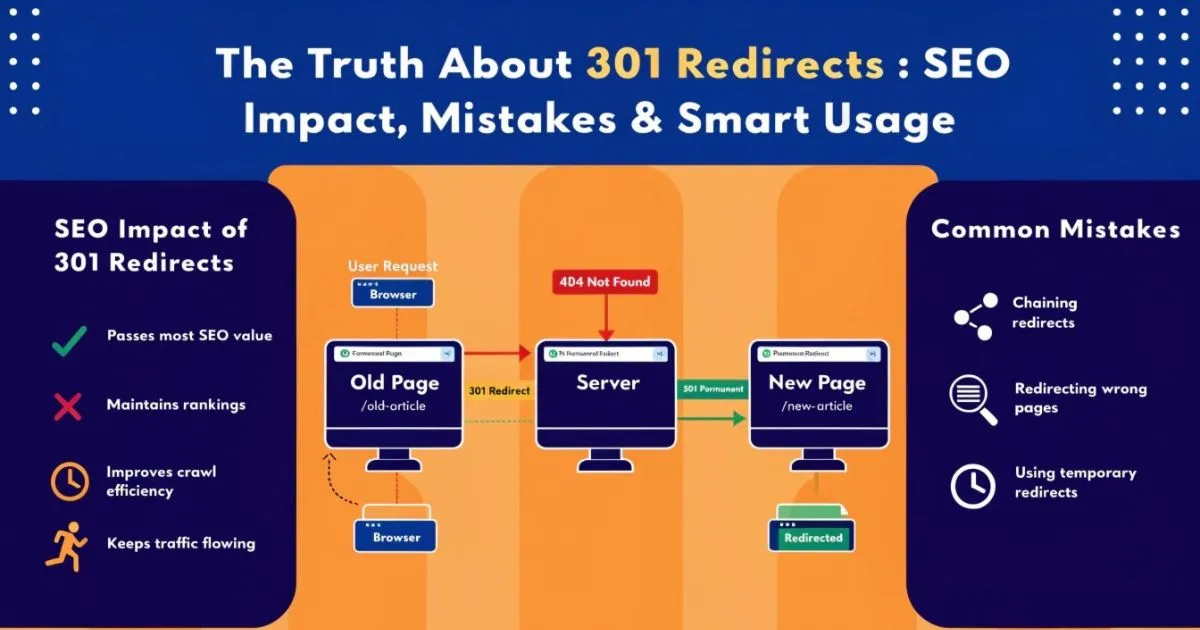
Introduction: Why 301 Redirects Matter More Than You Think
You know that feeling when you show up to a restaurant and the place has moved? If they were smart, they left a note on the door saying “Hey, we’re now at 45 Main Street, just two blocks down.” A 301 redirect is basically that note — but for websites.
When a URL changes, a 301 redirect tells browsers and search engines: this page has permanently moved, go here instead. The visitor never notices anything weird. They click a link, the redirect fires in milliseconds, and they land on the right page. Simple as that.
The “301” part is just the HTTP status code the server sends back. It is the internet’s way of saying “permanent move.” And that word permanent is what makes it so important for SEO.
Why Even Small Mistakes Can Impact SEO
Here is where a lot of people underestimate redirects. They think it’s just a technical box to check — set the redirect, move on. But the truth is, how you handle redirects can either protect everything you’ve built in search or quietly tear it apart.
A single redirect pointing to the wrong page, or three redirects chained together instead of one, or a 302 used where a 301 was needed — these are the kinds of things that bleed your site’s SEO value month after month without setting off any obvious alarms. And by the time you notice the rankings have slipped, it can take a long time to trace it back to the redirect setup.
Small mistakes compound. That’s the honest truth about redirects.
Also Read: HTTP Status Codes Explained: What They Mean and How to Fix Them
Who Should Read This
If you run a website, work in SEO, or are the developer responsible for pushing live URL changes — this is for you. Specifically:
- Site owners who are about to go through a redesign, rebrand, or migration and want to know what questions to ask their dev team.
- SEO professionals who need a reliable reference they can actually use when planning redirect strategies.
- Developers who implement the redirects and want to understand the SEO consequences of the choices they make at the server level.
We’ll go from the basics all the way through auditing and real-world examples. Feel free to jump to whatever section is most useful for where you are right now.
What is a 301 Permanent Redirect?
A 301 redirect is a server-level instruction that permanently forwards one URL to another. When your browser (or Googlebot) requests a URL that has a 301 on it, the server immediately says: “Stop, don’t look here — go to this other address instead, and update your records.”
That last part — “update your records” — is the critical bit. A 301 tells search engines to stop indexing the old URL and start treating the new one as the canonical address going forward. It’s a clean handoff.
Think of it like permanently forwarding your mail after a house move. All future correspondence goes to the new address. The old address effectively stops existing.
Difference Between 301 vs Other Redirects (302, 307)
| Redirect Type | What It Means |
| 301 — Permanent Redirect | Page has moved for good. Search engines update their index and pass link authority to the new URL. |
| 302 — Temporary Redirect | Page has moved temporarily. Search engines keep the original URL indexed and don’t reliably transfer authority. |
| 307 — Temporary (HTTP/1.1) | Similar to 302 but strictly preserves the original request method. Used in specific server setups, especially HTTPS enforcement. |
| Meta Refresh | A page-level redirect written in HTML. Slow, clunky, bad for SEO. Avoid it unless there’s no other option. |
The one that causes the most trouble in practice is 302 being used instead of 301. If a page has permanently moved and you’ve set up a 302 by accident, Google holds onto the old URL in its index. Your new page doesn’t get the credit it deserves. We’ll get into this more later.
Real-Life Example: Old Page to New Page
Let’s say you had a blog post sitting at:
https://www.yoursite.com/blog/old-post-name
You redesigned the site and now all blog posts live under a different URL structure:
https://www.yoursite.com/resources/new-post-name
A 301 redirect from the first URL to the second means anyone who bookmarked the old link still gets there. Every website that linked to the old URL still sends its SEO value to the new one. Google’s index entry for the old URL gradually gets replaced by the new one. Everything carries over — rankings, traffic, authority. That’s the job a 301 does.
How 301 Redirects Work (Behind the Scenes)
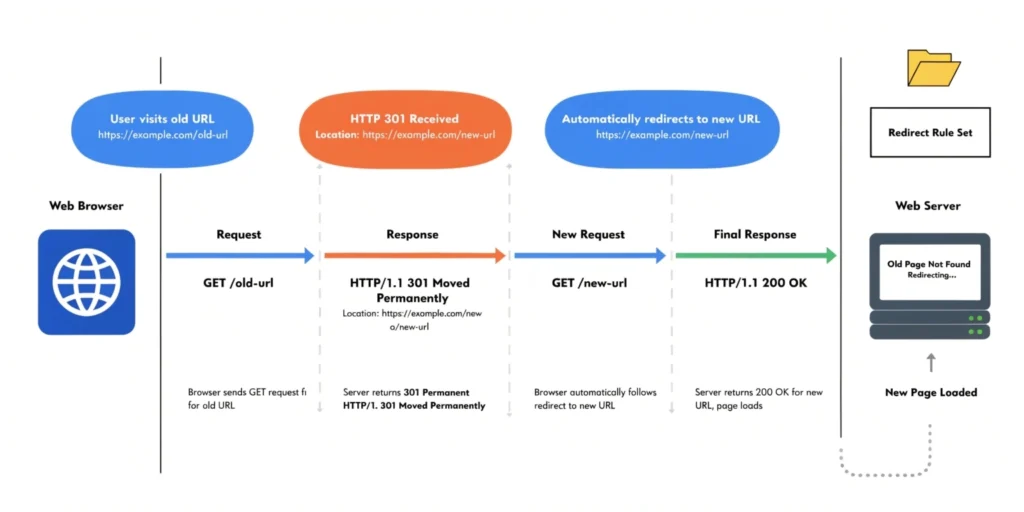
It all happens faster than you can blink, but here’s the sequence:
- Your browser sends a request to the server for the old URL.
- The server responds with a 301 status code and says: the new location is this other URL.
- Your browser automatically requests the new URL.
- The server responds normally (200 OK) and the page loads.
The whole thing takes a fraction of a second. Users don’t see any of it — they just land on the page. But there’s one important quirk: browsers cache 301 redirects. Once your browser has seen the redirect once, on future visits it skips the old URL entirely and goes straight to the new one. That’s good for speed, but it means if you ever need to change or remove a 301, some visitors might still be following the cached version for a while.
How Search Engines Treat 301 Redirects
When Googlebot crawls a URL and finds a 301, it follows the redirect — same as a browser. But unlike a browser, it also takes note of the relationship between the two URLs and starts a process of updating its index.
Over time (and it really can take weeks or even months on large sites), Google will:
- Drop the old URL from its index and replace it with the new one.
- Reassign the ranking signals it had associated with the old URL over to the new one.
- Update how it understands your site’s structure in relation to both URLs.
The key thing to understand is that this is not instant. There’s always a lag. During that lag, you might see rankings fluctuate. That is normal and expected — it doesn’t mean something went wrong.
Link Equity Transfer Explained Simply
Link equity — also called link juice in older SEO circles — is basically the ranking power that flows from one page to another through links. When a website links to one of your pages, it’s passing some of its own authority to you. Those accumulated links are one of the main reasons pages rank well.
A 301 redirect transfers most of that accumulated authority from the old URL to the new one. Not all of it — there’s a widely accepted (though not publicly confirmed) minor loss at each hop — but the majority carries over cleanly.
The keyword there is “most.” Each redirect hop chips away a little. One direct 301 from old to new? Great. Three hops getting there? You’re leaking value at every step. Which brings us to redirect chains, but we’ll cover that in its own section.
Do 301 Redirects Affect SEO?
Positive Impact:
- Passing link authority: Any page that has built up backlinks over time has something worth protecting. A 301 redirect is how you protect it when that page moves or gets consolidated into something else. Without the redirect, all of that link value just vanishes into a 404. With it, the value transfers to whatever new page you’re sending people to.
- Keeping rankings through a migration: Migrations are scary for SEO. Change the wrong things without a proper redirect plan and you can tank rankings you’ve spent years building. But when done right, a solid 301 redirect strategy is what allows a site to migrate domains, change URL structures, or switch to HTTPS without the rankings collapsing. It’s not a guarantee of zero impact, but it’s the closest thing you’ve got.
- Fixing duplicate URL problems: A lot of sites accidentally serve the same content on multiple URLs — with and without www, with and without a trailing slash, HTTP and HTTPS versions of the same page. Each of those variations splits your link signals. A 301 that forces everything through a single canonical URL pools all that authority into one place, which is always better than having it scattered across four versions of the same page.
Temporary Impact: What to Expect
- Ranking fluctuations right after: Don’t panic if your rankings move around in the weeks after setting up redirects. This is Google re-processing things. It needs to crawl the new URLs, recalculate relevance, and settle on where everything should rank. For most sites, things normalize within four to twelve weeks. If rankings are still volatile after three months, that’s when you start digging for a problem.
- Re-indexing takes time: The speed at which Google processes your redirect changes depends heavily on how often it crawls your site. A high-traffic site with fresh content gets crawled more frequently, so changes propagate faster. A smaller, slower-updated site might take months before Googlebot has fully processed a large batch of redirects. Submitting updated sitemaps through Search Console helps nudge things along.
When Should You Use 301 Redirects?
- Website Migration (HTTP to HTTPS, Domain Change): This is the big one. If you’re switching your whole site from HTTP to HTTPS — and you should be, if you haven’t already — every single HTTP URL needs a 301 redirect to its HTTPS version. Not a bulk “redirect everything to HTTPS homepage,” but actual one-to-one URL mapping.
The same logic applies to domain changes. Moving from olddomain.com to newdomain.com? Every URL on the old domain needs to map to the right corresponding URL on the new one. This is the only way to carry your existing SEO equity across. - URL Restructuring: URLs change for all kinds of reasons — a CMS upgrade, a rebrand, a decision to use cleaner slugs, a change in site architecture. Whenever a URL changes, the old one needs a 301. No exceptions. Even if the old URL is getting barely any traffic, you don’t know who has linked to it or bookmarked it. A redirect costs almost nothing. Not having one when you needed one can cost a lot.
- Deleting Pages with Backlinks: Before you delete any page, check if it has backlinks. If it does — even a handful — just deleting the page is a waste. Those links are votes from other sites. A 301 to the most relevant existing page on your site salvages that value. It’s one of the easiest wins in technical SEO and one of the most frequently skipped.
- Content Consolidation: Over the years, a lot of sites end up with five or six posts covering basically the same topic from slightly different angles. None of them are strong enough to rank on their own. Merging them into one thorough piece — and 301 redirecting all the old URLs to the new consolidated one — pools their combined link equity into a single, stronger page. This strategy genuinely works, and the ranking lift often comes faster than people expect.
- Fixing Canonical Issues: Canonical tags are a hint to search engines. 301 redirects are a hard instruction. When you have confirmed duplicate URL situations — www vs non-www being one of the most common — a 301 redirect is the definitive way to resolve it. It leaves no room for ambiguity. Google follows the redirect, updates its index, and moves on. A canonical tag alone sometimes gets ignored; a 301 doesn’t.
When 301 Redirects Can Hurt Your Website
Here’s the honest conversation most redirect guides skip. Done carelessly, redirects don’t just fail to help — they actively cause problems. These are the five scenarios that most commonly hurt sites:
- Redirect Chains: A redirect chain is when URL A sends you to URL B, which then sends you to URL C. That extra hop isn’t just a minor inconvenience — it costs you. Every step in the chain adds page load time, consumes crawl budget, and bleeds a little link equity. Fix chains by updating the source redirect to skip the middle URLs and point directly to the final destination.
- Redirect Loops: A loop is what happens when Page A redirects to Page B, and Page B redirects back to Page A. Both browsers and search engines hit a dead end — browsers usually throw an error message, and Googlebot just gives up. Loops almost always come from misconfigured .htaccess files, CMS redirect plugins, or CDN rules that are fighting each other. They’re not obvious until someone tries to visit the page and finds it completely broken.
- Irrelevant Redirects: If you delete a page about cycling helmets and redirect it to your homepage because you can’t think of a better destination, Google is going to treat that as a soft 404. It’s smart enough to recognize when a redirect lands the user on something completely unrelated to what they were looking for. In that case, you’d honestly be better off showing a clean 404 and using a good custom error page to keep the visitor engaged.
- Too Many Unnecessary Redirects: Not every old URL needs a redirect. If a page never had any traffic, no backlinks, and wasn’t indexed, redirecting it just adds clutter. On large sites, a redirect table with thousands of unnecessary entries slows down server response times and makes the whole redirect map harder to manage. Be strategic about which URLs are worth redirecting and which ones can just 404 cleanly.
- Broken Redirects (404 After Redirect): This one happens more than people realize. You set up a 301 to a destination URL — but then later that destination gets renamed, deleted, or restructured. Now you’ve got a redirect that fires correctly but lands on a 404. The result is worse than having no redirect at all: you’re burning crawl budget, passing zero link equity, and frustrating users with an extra load time before hitting a dead end. Regular audits catch these.
What is the Safe Threshold for 301 Redirects?
No Fixed Number — Let’s Kill This Myth
People keep asking “how many 301 redirects is too many?” and the answer is: there’s no magic number. Google has never said “you have too many redirects, here’s a penalty.” That’s not how it works.
What Google cares about is not the count — it’s the quality and configuration. A site with 50,000 well-structured, single-hop redirects that all lead to live, relevant pages is in great shape. A site with 200 redirect chains and loops is in trouble, even though the number is tiny by comparison.
John Mueller from Google has confirmed this directly: the number of 301 redirects on a site is not itself a ranking signal. What matters is whether they’re set up correctly.
Practical Limits to Know
- Ideal number of hops: One. Every redirect should be a single direct hop from the old URL to the final destination. Google says it will follow up to five hops, but in practice most SEO professionals aim for a hard limit of three — and one is always better than two. The further you get from “one hop,” the more you’re gambling with equity loss and speed.
- Site-wide redirect tables: On a large site, redirect tables with tens of thousands of entries are totally normal and manageable. The key is keeping them clean — quarterly audits to catch broken destinations, chains that have formed over time, and entries that can be retired because the old URLs no longer get any traffic or links pointing to them.
Large-Scale Migrations: Handling Thousands of Redirects Safely
Big migrations are where redirect strategy really gets tested. A poorly planned migration on a 10,000-page site can take six months to recover from. Here’s how to approach it without getting burned:
- Crawl everything before you touch anything. Export a complete list of live URLs, their traffic, backlink counts, and indexation status. This is your baseline.
- Sort by priority. High-traffic pages and pages with backlinks get mapped first. Low-traffic, no-backlink orphan pages are lower priority and might not need redirects at all.
- Build a proper redirect map. Old URL to new URL, one-to-one, in a spreadsheet. Don’t allow “redirect everything unmapped to the homepage” — that’s a mass soft 404 waiting to happen.
- Test on staging before launch. Use a tool like Screaming Frog on your staging environment to walk every old URL and confirm it resolves in one hop to the correct new URL with a 301 status.
- Submit updated XML sitemaps through Search Console the day you go live. This tells Google to get crawling the new URLs sooner rather than later.
- Watch Search Console and analytics daily for the first month. You’re looking for crawl error spikes, indexation drops, and unusual ranking shifts.
- Leave the redirects in place. Twelve months minimum. Indefinitely if you can. External sites that linked to your old URLs will take a long time to update their links — if they ever do.
301 Redirect Chains: Why They Kill Performance
What is a Chain?
A redirect chain is any situation where getting from the source URL to the final destination takes more than one redirect. The simplest example:
A (original URL) → B (intermediate URL) → C (final destination)
This happens more often than people expect. It usually starts when a URL gets redirected once during a site update, and then the destination URL later gets restructured and redirected again. Nobody went back and updated the original redirect, so now there’s a chain.
- Impact on crawl budget: Google allocates a crawl budget to every site — basically a limit on how many requests it’ll make per day. Each URL in a chain consumes a separate request. So a redirect chain doesn’t just waste one crawl budget unit, it wastes two or three. On a site with thousands of chained redirects, Googlebot ends up spending a significant chunk of its budget just navigating chains instead of discovering new content.
- Impact on page speed: Every redirect adds a network round-trip before the browser can even start loading the actual page. That’s typically somewhere between 100 and 300 milliseconds per hop, depending on server latency. Two extra hops can add half a second of pure waiting time before anything loads. Given that Core Web Vitals are a ranking factor, and LCP (Largest Contentful Paint) is part of that, redirect chains can directly drag down your scores.
- Impact on SEO value: There’s no official Google documentation with exact numbers on this, but the SEO community has run enough tests over enough years to be fairly confident: each hop in a chain results in a bit less equity reaching the final destination than a direct 301 would transfer. One hop is always better than three. Fix chains by going back to the original redirect source and pointing it directly at the final URL, skipping the intermediates entirely.
301 Redirect vs 302 Redirect: Which One Should You Use?
This comparison trips people up all the time — partly because some tools and CMS platforms default to 302 even when a 301 is appropriate, and people don’t think to check.
| Factor | 301 vs 302 |
| Nature of Change | 301: Permanent. 302: Temporary. |
| SEO Equity Transfer | 301: Passes most link authority to the new URL. 302: Unreliable — equity often stays on the original URL. |
| How Google Indexes It | 301: Old URL gets replaced in the index by the new one. 302: Old URL stays indexed; Google treats the new one as temporary. |
| When to Use It | 301: Domain migrations, URL restructuring, HTTPS switch, permanent content moves. 302: A/B testing, seasonal pages, geo-redirects, login-required detours. |
| Browser Caching | 301: Browser caches the redirect; future visits skip the original URL. 302: Not cached — browser checks the original every time. |
| Most Common Mistake | Using 302 when you meant 301. Rankings stick to the old URL that no longer exists rather than following to the new one. |
The rule is really simple: if the page is gone for good, use a 301. Only reach for a 302 if you genuinely plan to bring the original URL back — like a seasonal sale page, an A/B test, or a temporary maintenance redirect. When in doubt, 301 is almost certainly correct.
Best Practices for Using 301 Redirects (Must Follow)
- Always redirect to relevant pages: This one’s non-negotiable. A redirect to a completely unrelated page does nothing for the user and nothing for SEO. If you’re retiring a product page, send it to the closest equivalent product or category. If you’re consolidating blog posts, send them to the new combined piece. The closer the topical match, the more value the redirect preserves.
- Avoid chains and loops: Every time you update a URL that had an existing redirect pointing to it, go back and update the source redirect too. Don’t layer new redirects on top of old ones. Build the habit of checking for chains whenever you make structural URL changes — it takes five minutes with a crawl tool and saves hours of debugging later.
- Update internal links: A 301 redirect handles external traffic beautifully. But your own internal links — in blog posts, navigation menus, footers, CTAs — still pointing to old URLs are adding unnecessary hops every time a user or Googlebot follows them. After any URL migration, run a full site crawl and update every internal link to point directly to the new URL. It’s tedious, but it matters.
- Keep redirects active long-term: Once rankings have recovered and the migration looks stable, it’s tempting to trim old redirects to clean things up. Resist that. Backlinks from other sites can take years to be updated — if they’re updated at all. Removing a redirect twelve months in turns all of those external links into 404s overnight. Keep redirects live for at least a year, and honestly, the safest play is to leave them indefinitely.
- Test before and after with proper tools: Don’t assume a redirect is working just because you set it up. Tools like Screaming Frog, HTTPStatus.io, or even the browser’s network panel will show you the exact status code being returned, the destination URL, and how many hops it takes to get there. Test before you launch, and test again a week after to catch anything that shifted due to caching or CDN behavior.
Common 301 Redirect Mistakes to Avoid
- Redirecting Everything to the Homepage: This is the most widespread mistake in large-scale migrations. When a URL doesn’t have an obvious one-to-one match on the new site, the lazy solution is to redirect it to the homepage. It feels like you’re “at least doing something” — but Google sees right through it.
A redirect from a specific blog post or product page to the homepage is treated as a soft 404. Google knows the user isn’t actually getting what they were looking for. The link equity from all those pages essentially evaporates. Do the harder work of finding the most relevant existing page to redirect to, even if it’s a broad category page. It’s worth it. - Ignoring Internal Links: Setting up your redirects and calling it done is only half the job. Your own internal links — in articles, navigation, footers, related content sections — are still pointing to old URLs. Every one of those is an unnecessary redirect hop every time a user or Googlebot follows them.
Over time, this accumulates. On a site that’s been through several migrations, you can end up with internal links going through two or three redirect hops before reaching the actual page. Run a crawl after any major URL change and clean up internal links so they point directly to the final destinations. - Not Testing Redirects: A staggering number of redirect errors come from people assuming the configuration worked because they set it up. WordPress plugins conflict with each other. Nginx rules interact in unexpected ways. CDN caching can serve the wrong response for days after you’ve fixed a rule at the server level.
Test every redirect manually or with a tool before and after launch. Check the status code, check the destination URL, check the number of hops. A two-minute check per URL saves a lot of headaches downstream. - Removing Redirects Too Early: This one bites people especially after big migrations. The rankings have recovered, everything looks stable, and someone decides to prune the redirect list to clean up the server config. Then organic traffic quietly starts dropping as all those external backlinks that were still pointing to old URLs start hitting 404 errors.
Old URLs live on in places you’d never expect — cached versions of third-party pages, PDFs on other sites that linked to you, press releases from five years ago, backlink profiles of sites that never update their content. Keep redirects active for at least twelve months, and when possible, just leave them running permanently.
How to Check and Audit Your 301 Redirects
Using Google Search Console
Search Console is your best free starting point. Head to the Pages report (under Indexing) and look at the “Not indexed” tab. There’s a specific category for “Redirected” pages — this shows you which URLs Google is seeing as redirects rather than canonical pages. A large number here after a migration is expected and healthy. If it’s growing over time on a stable site, something is off.
Also keep an eye on the Core Web Vitals report. If you see LCP scores degrading after a migration, redirect chains are one of the first things to investigate. And watch the Coverage report for spikes in crawl errors — those can sometimes trace back to redirect destinations that broke after the fact.
Using Crawling Tools
For a proper audit, you need a dedicated crawling tool. The most commonly used ones in professional SEO work:
- Screaming Frog SEO Spider: Crawls your site and shows you the status code, redirect destination, and chain length for every URL. You can filter specifically for redirect chains and export the whole list for cleanup. Free version covers up to 500 URLs; paid version handles enterprise-scale sites.
- Sitebulb: Similar capability to Screaming Frog with better visualization of how redirect chains connect. Useful for presenting findings to clients or stakeholders who prefer visual reports.
- Ahrefs and Semrush: Their site audit modules flag redirect issues and also show which of your backlinks are pointing to redirected or broken URLs — which is invaluable for prioritizing which redirects to fix first.
What Issues to Look For
When you run an audit, these are the specific things to hunt for and fix:
- Redirect chains of three or more hops — flatten every one of them to a direct single-hop redirect.
- Redirect loops — trace the circular path and break it, usually by removing or correcting one of the rules in the chain.
- Redirects pointing to 404 pages — update the destination to a live, relevant URL.
- 302 redirects being used in places where a 301 is clearly correct — check this especially if you recently used a CMS plugin to set up redirects, as many default to 302.
- Internal links still pointing to redirected URLs — update them to point directly to the final destination.
- Redirected URLs still sitting in your XML sitemap — sitemaps should only contain canonical, indexable URLs. Redirected ones shouldn’t be in there.
Also Read: How to Use Branded Query Filtration to See Your Real SEO Performance
Real-Life Examples of 301 Redirect Usage
Example 1: HTTPS Migration Done Right
A local services business had spent three years building up decent rankings on HTTP. When they finally made the switch to HTTPS — partly due to Chrome’s “Not Secure” warnings scaring off visitors — the developer set up proper one-to-one 301 redirects from every HTTP URL to its HTTPS version.
No bulk “redirect all HTTP to HTTPS homepage” shortcuts. Every page mapped individually. Within six weeks, rankings had fully stabilized and organic traffic was back to normal. The transition was effectively invisible from a search perspective.
Example 2: Saving Link Equity from a Discontinued Product
An e-commerce store discontinued a product that had been around long enough to collect more than 300 backlinks from review sites and deal aggregators. The obvious thing to do was delete the page. The smart thing to do was check the backlink profile first.
They redirected the old product URL to the closest equivalent product they still carried. The destination page saw a measurable uptick in organic visibility over the following two months. All that link equity that would have evaporated into a 404 got channeled into a page that was still making the business money.
Example 3: A Rebrand Migration Across Domains
A SaaS company went through a full rebrand and needed to move everything from the old domain to a new one. The initial redirect setup created a two-hop chain: http://oldbrand.com was redirecting to https://oldbrand.com, which was then redirecting to https://newbrand.com.
The SEO team caught this in pre-launch testing and fixed it so that all requests to oldbrand.com — whether HTTP or HTTPS — redirected in a single hop to the correct HTTPS URL on newbrand.com. Rankings recovered within ten weeks of launch, which is about as good as you can expect for a full domain migration.
Example 4: Content Consolidation That Actually Worked
A content site had published eleven separate articles on variations of the same broad keyword topic over about four years. None of them were strong enough to crack the top five on their own. The editor merged the best parts of all eleven into one comprehensive guide, then 301 redirected all the old URLs to the new piece.
Within a month, the consolidated guide was outranking all eleven individual articles combined. The pooled link equity from all those old posts, plus the greater depth of the new content, pushed it well ahead of where any single article had ever managed to get.
Conclusion: Are 301 Redirects Good or Bad?
Neither. 301 redirects are a tool. And like any tool, the outcome depends entirely on how you use them.
Used well, they’re one of the most valuable things in technical SEO. They protect rankings through migrations, preserve link equity from deleted and restructured pages, resolve duplicate content cleanly, and keep users from hitting dead ends. Sites that handle redirects thoughtfully tend to hold their rankings through changes that would cripple less careful competitors.
Used sloppily, they do real damage — quietly and cumulatively. Chains bleed equity. Irrelevant redirects waste crawl budget. Loops break pages entirely. Redirects to 404s are worse than no redirect at all. And none of this is obvious from the outside until the ranking drops start showing up in your data.
The bottom line: 301 redirects are not good or bad by nature. They’re only as good as the strategy and care put into setting them up.
If you’ve never done a proper redirect audit on your site, there’s a reasonable chance something in your redirect setup is costing you right now. Chains that formed unnoticed during past migrations. A few broken destinations. Some 302s where 301s should be. These things accumulate quietly. The fix isn’t complicated. Crawl your site, check the redirect map, flatten the chains, fix the broken destinations, update the internal links. It’s not glamorous SEO work, but it’s the kind of foundational maintenance that compounds over time — and it’s a lot easier to get right than to recover from when it goes wrong.